Most content calendars die within a month. Someone builds a beautiful spreadsheet on a Monday afternoon, fills in three weeks of blog posts and social captions, and by week four nobody’s touched it. The team is back to deciding what to publish the night before, because the calendar never became part of how anyone actually worked.
That’s not a tooling problem. It’s a planning problem. A content calendar only survives if it’s built around real goals, a workload your team can sustain, and a structure simple enough that updating it feels faster than ignoring it.
This guide walks through how to build one that lasts, from the first planning question to the habits that keep it alive months later.
TL;DR
- Start with goals, not dates. A calendar built around vague intentions collapses faster than one built around a specific, measurable target.
- Audit existing content and know your audience before creating anything new, so you’re not duplicating work or guessing at topics.
- Pick a sustainable publishing frequency per channel. A smaller cadence you can keep beats an ambitious one you abandon in a month.
- Keep the calendar structure simple at first: title, content type, channel, publish date, owner, status. Add fields later as needed.
- Plan in themes and mix evergreen content with timely pieces so you always have something worth publishing.
- Build in a real workflow (owner, approval steps, deadlines) and a promotion plan for every piece, not just a list of dates.
- Review and update the calendar weekly or biweekly. A calendar nobody maintains becomes a calendar nobody trusts.
What Is a Content Calendar?
A content calendar is a shared schedule showing what content you’re publishing, where, and when. At minimum, it tracks a title, a publish date, an owner, and a status, so anyone on the team can glance at it and know exactly what’s happening next.
It’s worth separating this from a social media calendar, since people often use the terms interchangeably. A content calendar covers everything, blog posts, emails, videos, podcasts, across every channel. A social media calendar is narrower and execution-focused, tracking the specific copy, creative, and timing for individual posts. Most teams end up needing both, with the social calendar nested inside the broader content plan.
Why a Content Calendar Actually Matters
A calendar isn’t busywork. It solves specific problems that show up the moment more than one person touches your content.
It keeps publishing consistent. Random, occasional posting rarely builds an audience. A calendar forces a rhythm, so your readers know roughly when to expect something new, and search engines see a site that’s actively maintained rather than abandoned.
It kills the daily scramble. Without a plan, every morning starts with “what are we posting today,” which is a bad use of anyone’s time. A calendar moves that decision upstream, so execution days are about creating, not deciding.
It surfaces gaps and overlaps before they cost you. Laid out on a calendar, it becomes obvious if three pieces are all covering the same angle, or if a key product launch has no supporting content planned around it.
It gives your team one shared source of truth. Instead of Slack messages and half-remembered conversations about who’s writing what, everyone can check one place and know their responsibilities and deadlines.
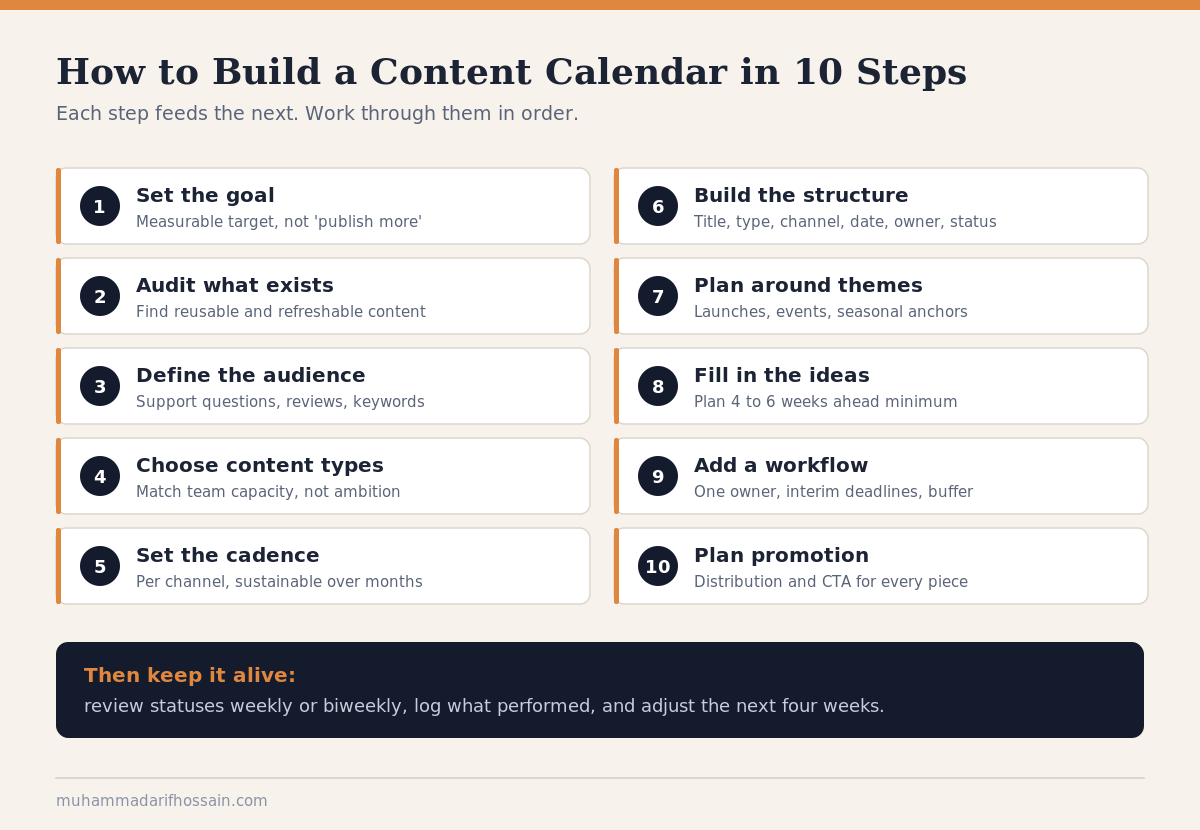
Step 1. Start With Goals, Not Dates
The biggest mistake in building a content calendar is opening a blank spreadsheet and immediately typing in publish dates. Dates without a purpose behind them just create pressure without direction.
Before touching a calendar template, get specific about what your content is supposed to do. Is it meant to bring in new leads, build organic search visibility, grow a social following, or keep existing customers engaged? Each goal points toward a different mix of content, channels, and frequency.
Write these goals down using a simple, measurable structure. “Publish more content” isn’t a goal you can plan around. “Publish 8 SEO-focused blog posts a month to grow organic traffic 20% this quarter” is something you can actually build a calendar against, because it tells you volume, focus, and how you’ll know it worked.
Step 2. Audit What You Already Have
Before creating anything new, look at what already exists. Most teams have more usable content sitting around than they realize, and skipping this step means duplicating effort you’ve already done.
Pull together a simple list of your existing blog posts, social content, videos, and emails, along with when they were published and how they performed. This does two things at once. It shows you which topics and formats already resonate with your audience, and it flags outdated content worth refreshing instead of writing from scratch.
Old, high-performing posts are often the fastest calendar wins available. Updating a strong post with current information and republishing it usually takes a fraction of the time a brand-new piece does, and it can outperform new content precisely because it already has some traction.
Step 3. Know Who You’re Actually Planning For
Every topic and format decision downstream should trace back to a clear picture of your audience. Skip this step and you end up filling the calendar with whatever’s easiest to write, not what your reader actually needs.
Pull together what you already know: common questions from customer support, patterns in comments and reviews, and conversations your sales or service team has regularly. If you have access to keyword research tools, use them to see what people are actively searching for around your topics, not just what you assume they’re interested in.
This doesn’t need to be a formal, months-long research project. Even a rough, one-page picture of who you’re writing for and what they’re trying to solve will noticeably sharpen your topic choices.
Step 4. Decide What You’ll Actually Create
Content type decisions should follow from your goals and audience, not from what looks impressive on a planning document. Trying to run blog posts, a podcast, weekly video, and daily social all at once, from day one, is how most calendars collapse under their own weight.
Pick a realistic mix based on what your team can produce consistently and what format your audience actually prefers. If your audience skims rather than reads, invest more in visual and short-form content. If they’re making a considered, higher-cost decision, long-form guides and case studies usually earn more trust.
Build in a base of evergreen content. Evergreen pieces, things like how-to guides, FAQs, and foundational explainers, stay useful long after publishing, unlike content tied to a specific trend or news moment. Keeping a stock of evergreen ideas on hand means you always have something worth publishing even in a slow week with no trending hook to work from.
Step 5. Choose a Sustainable Publishing Frequency
There’s no universal “right” posting frequency. The right cadence is the fastest one your team can sustain without a drop in quality, not the fastest one that sounds ambitious in a planning meeting.
Consider setting a different cadence per channel rather than forcing the same rhythm everywhere. A blog might run twice a week, a newsletter once a month, and social several times a week, since each channel has a different production cost and a different audience expectation for how often you should show up.
Start conservative. It’s far better to reliably publish one strong piece a week for six months than to commit to daily content and quietly stop after three weeks. A calendar that consistently gets ignored teaches your team to ignore it, and rebuilding that trust takes longer than building it right the first time.
Step 6. Build Your Content Calendar Structure
With goals, audience, and cadence decided, you’re ready to actually build the thing. Keep the initial structure simple. It’s much easier to add fields later than to convince a team to keep filling in ten columns they never asked for.
At minimum, include:
- Title or topic: What the piece is actually about
- Content type: Blog post, video, email, social post, and so on
- Channel: Where it will be published
- Publish date: When it goes live
- Owner: Who is responsible for getting it done
- Status: Idea, in progress, in review, scheduled, or published
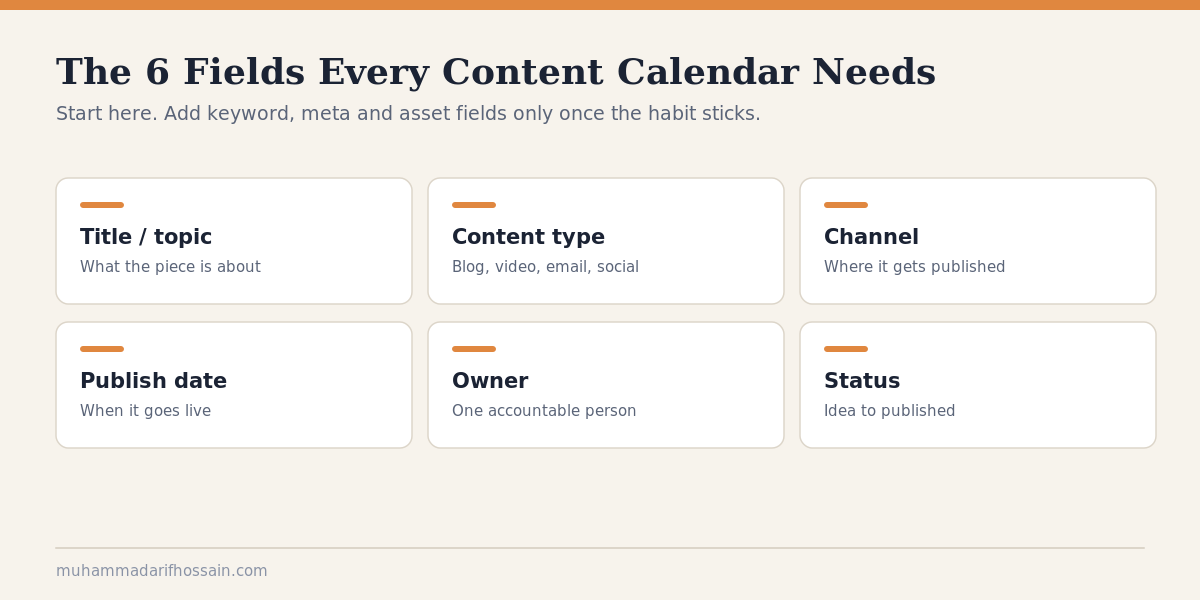
Once the basics are working, you can layer in fields that matter more for specific content types. Blog posts benefit from tracking a target keyword and meta description. Social posts benefit from tracking captions, hashtags, and creative assets. Video and podcast entries benefit from tracking script links and interviewee details. Add these only once the core habit of using the calendar is already solid.
Step 7. Plan Around Themes and the Calendar Year
Filling a calendar one random idea at a time makes for a scattered content mix. Planning in themes makes the whole thing feel more intentional and makes brainstorming genuinely easier, since you’re generating ideas inside a defined topic instead of staring at a blank page.
Start by marking the calendar year with anything that should shape your content: product launches, industry events, seasonal moments, and any recurring dates relevant to your audience. These fixed points become natural anchors to plan the surrounding content around.
From there, group your own ideas into themes or campaigns rather than scattering unrelated topics across the month. A themed week or month gives your content a sense of build, where one piece sets up curiosity that the next piece answers, instead of readers encountering a random grab bag every time they visit.
Step 8. Get the Ideas Onto the Content Calendar
With structure and themes in place, it’s time to actually fill the calendar with specific pieces. A short brainstorming session, done regularly rather than once a year, keeps the pipeline from running dry.
Draw ideas from more than one source: recurring customer questions, keyword research, what’s performed well historically, and gaps you noticed during your content audit. Mixing evergreen ideas with timely ones keeps the calendar resilient. Timely content can spike quickly, but evergreen content is what keeps working long after the trend fades.
Try to plan four to six weeks ahead at minimum. That gives enough runway for research, drafting, and review, while still leaving a little room near the front of the calendar for something timely or reactive if it comes up.
Step 9. Set Up a Workflow, Not Just a Schedule
A calendar full of dates means little if nobody knows who’s supposed to do what by when. Map out the actual path each piece takes: who pitches the idea, who writes it, who reviews it, who gives final approval, and who publishes and promotes it.
Assign one clear owner per piece, even if multiple people contribute along the way. Shared ownership without a single accountable person is usually how deadlines quietly slip, since everyone assumes someone else is tracking it.
Work backward from the publish date to set interim deadlines for drafts, feedback, and final approval, leaving some buffer for the inevitable delay. A calendar with zero slack breaks the first time someone’s out sick or a review takes longer than expected.
Step 10. Don’t Forget Promotion
Publishing content is only half the job. A calendar that only tracks creation and ignores distribution quietly turns hours of writing and editing into content nobody sees.
For each piece, plan how it will actually reach people: a social post, an email mention, an internal Slack share, outreach to a relevant publication. Build these promotion tasks directly into the calendar alongside the publish date, instead of leaving distribution as an afterthought once the piece is already live.
Give every piece a clear next step for the reader, too. A blog post or video that ends without direction wastes the attention it just earned. Whether that’s subscribing to a newsletter, reading a related post, or booking a call, decide the call to action while you’re planning the piece, not after it’s already published.
Choosing a Content Calendar Tool
The right tool depends far more on your team’s size and habits than on which platform has the most features. A tool nobody opens is worse than a plain spreadsheet everyone actually checks.
Spreadsheets (Google Sheets, Excel) are free, familiar, and easy to share, which makes them a solid starting point for solo creators and small teams. The trade-off is manual upkeep and a higher chance of accidental edits or version confusion as more people get involved.
Project management tools (Trello, Notion, Asana) add visual boards, task assignment, and status tracking, which helps once more than two or three people are contributing regularly. They take more setup time upfront and can occasionally introduce more structure than a small team actually needs.
Dedicated content or social platforms (Airtable, Sprout Social) add built-in scheduling, approval workflows, and performance tracking in one place. These make the most sense once you’re managing content across several channels and reviewers, where a spreadsheet starts creating more friction than it removes.
Whichever you pick, test it with a real week of content before rolling it out to the whole team. A tool that looks great empty can still turn out to be a poor fit once real deadlines and real revisions are involved.
Common Mistakes That Kill a Content Calendar
Overcommitting on volume. An ambitious calendar looks impressive for about a week, right up until the team can’t keep pace and starts quietly skipping entries. Start smaller than feels ambitious, and build up once the rhythm is proven.
Treating it as a one-time setup. A calendar built once and never revisited drifts out of date fast, and an outdated calendar gets ignored, which makes the whole tool worthless. Build in a short weekly or biweekly check-in to update statuses and adjust upcoming plans.
Skipping the promotion plan. Plenty of good content underperforms simply because nobody built distribution into the plan. Promotion deserves its own line item, not an afterthought squeezed in after publishing.
Ignoring performance data. A calendar that only looks forward, and never back at what actually worked, keeps repeating the same mistakes. Revisit performance regularly and let it inform what you plan next, not just what you already committed to.
Keeping it invisible to the team. A calendar that lives only in one person’s head or one person’s laptop isn’t really a team tool. Everyone contributing to content should have access to see it and update their own pieces.
Related Guides
- Content Marketing Strategy: 8 Steps That Actually Work
- Link Building Strategy: 57 Links, No Budget, and Traps to Avoid
- How to Become a Digital Marketer: An Honest Roadmap for 2026
Need Help Building One That Sticks?
A content calendar is easy to sketch out in an afternoon and genuinely hard to keep alive once real deadlines and real priorities show up. Most teams don’t fail at the planning part. They fail at the follow-through.
I work on content and marketing systems for SaaS and WordPress products every day, calendars included. If you want help building one your team will actually use six months from now, reach out here. I read and reply to every message myself.
Frequently Asked Questions
What should a content calendar include?
A content calendar should include, at minimum, a title or topic, content type, publish date, owner, and status. More advanced calendars also track target keywords, distribution channels, and links to drafts or creative assets, but it’s best to start simple and add fields only once the basic habit is working.
How far in advance should I plan my content calendar?
You should plan your content calendar four to six weeks in advance at minimum, so there’s enough time for research, drafting, and review. It’s still worth leaving a little flexibility near the front of the calendar for timely or reactive content that comes up unexpectedly.
What’s the difference between a content calendar and a social media calendar?
The difference between a content calendar and a social media calendar is scope. A content calendar covers every content format and channel your team manages, including blogs, email, and video. A social media calendar is narrower and execution-focused, tracking the specific copy, creative, and timing for individual social posts.
How often should I post to keep a content calendar consistent?
You should post as often as your team can sustain without dropping quality, since there’s no universal ideal frequency. A realistic, smaller cadence you can maintain every week beats an ambitious one you abandon after a month.
Do I need special software to build a content calendar?
You don’t need special software to build a content calendar. A simple shared spreadsheet works well for solo creators and small teams. Dedicated tools become more useful once you’re coordinating several contributors, multiple channels, or a formal approval process.
How do I keep a content calendar from becoming outdated?
You keep a content calendar from becoming outdated by reviewing and updating it on a regular schedule, ideally weekly or biweekly, rather than treating the initial setup as finished work. Building a short recurring check-in into your team’s routine is what keeps the calendar accurate instead of a stale document nobody trusts.