You built a good WordPress plugin. It solves a real problem. The code is clean.
And almost nobody is buying it.
This is the most common story in the WordPress product world. Developers assume that a good product markets itself. It doesn’t. The plugins making real money aren’t always the best-built ones. They’re the ones with a system behind them.
That system is a funnel.
This guide walks through that entire funnel. From the day before you write a line of marketing copy, to the day a happy customer sends you their third referral. No theory dumps. Just what to do at each stage.
TL;DR
- Map your funnel across six stages — Discover, Install, Activate, Upgrade, Renew, Refer — then fix the one stage leaking worst before you touch anything else. Trying to move all six at once moves none of them.
- Rewrite your WordPress.org title before anything else. Your top two or three keywords go ahead of your brand name, because the title outweighs every other field in repository search.
- Define your aha moment (first form published, first backup completed) and cut the steps to reach it from seven down to three. Roughly one in five uninstalls happens because nobody guided the user, not because your WordPress plugin was bad.
- Treat your WordPress plugin dashboard as your highest-converting landing page. You own it outright, and a contextual prompt at the moment a user hits your 100-entry limit beats a permanent GO PRO banner every time.
- Publish comparison and alternative pages before you write more feature content. Someone searching “alternative to [competitor]” has already decided to switch and just needs somewhere to go.
- Set up three cart recovery emails at one hour, 24 hours, and three days after abandonment. You automate it once and it runs forever.
- Sell to agencies deliberately. Give them a multi-site tier, white-label options, and the words “for agencies” somewhere on your site, because one agency installs you across 40 client sites and renews for years.
Why Most Plugin Marketing Fails
Two mistakes cause most of it.
Mistake one: marketing the WordPress plugin instead of the problem.
Developers write about features. Buyers search for problems. Nobody wakes up wanting “advanced conditional logic for form fields.” They wake up frustrated that their contact form sends the same generic reply to every lead.
Your marketing has to live in the language of the frustration, not the language of the codebase.
Mistake two: treating launch day as the finish line.
Launch is maybe five percent of WordPress WordPress plugin marketing. The other ninety-five percent is the boring, repeatable work that happens every week for two years afterward.
A funnel fixes both problems. It forces you to think about the person before they know you exist, and about the customer eighteen months after they paid you.
The Plugin Funnel, In Plain English
Forget the classic marketing textbook funnel. Plugins work differently.
Here’s the version that actually matches how people buy WordPress products:
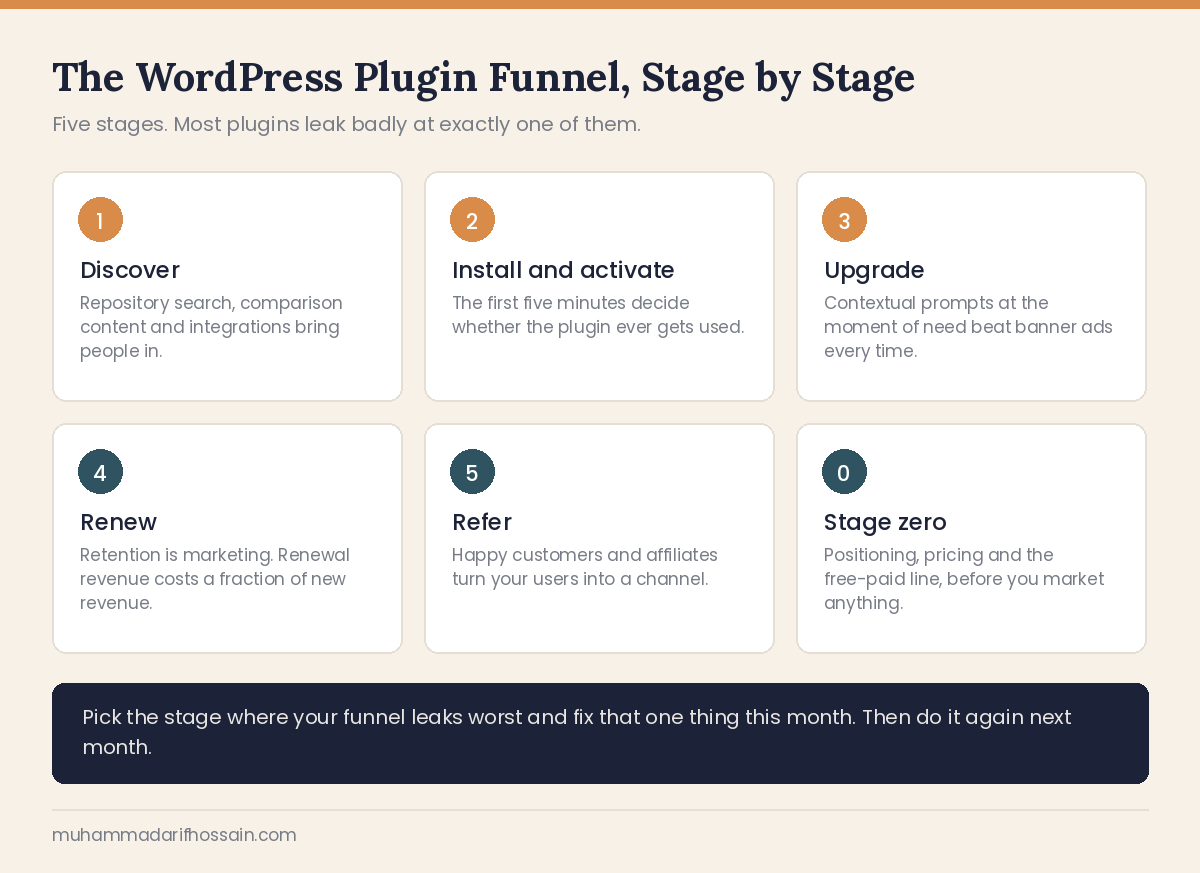
Discover → Install → Activate → Upgrade → Renew → Refer
Six stages. Each one has its own job.
- Discover — they learn a solution exists
- Install — they put the free version on a site
- Activate — they get their first real result from it
- Upgrade — they hit a limit and pay to remove it
- Renew — they decide you’re still worth the money
- Refer — they tell someone else
What makes this different from normal SaaS? The free version sits inside your funnel, not outside it. Your WordPress.org listing isn’t a lead magnet. It’s a full product that people use for years without paying you a cent.
That sounds like a problem. It’s actually your biggest advantage. You get to market to a warm, engaged audience inside their own dashboard, every single day.
Most WordPress plugin businesses waste that completely.
Stage Zero: Do This Before You Market Anything
Marketing a WordPress plugin nobody wants is just an expensive way to learn you built the wrong thing.
Three things come first.
Pick a wedge, not a category
“Form plugin” is a category. You will lose that fight.
“Form plugin for medical clinics that need HIPAA-compliant intake” is a wedge. You can win that.
Start narrow enough to be the obvious choice for someone. You can widen later. Almost every big WordPress plugin started as a narrow tool for a specific group.
Write your one-sentence positioning
Fill in this blank and don’t move on until it sounds natural out loud:
“[Plugin] helps [specific person] do [specific job] without [the annoying thing they do now].”
If you can’t finish that sentence, your homepage won’t work either. And neither will your .org description, your ad copy, or your cold emails.
Build a list before you build a landing page
Start collecting emails the week you start coding. A simple page with the problem, a screenshot, and an email field is enough.
Two hundred people on a waitlist beats two thousand random visitors on launch day. Those two hundred already told you they have the problem.
Stage 1: Discover — Getting Found
This is where most of your effort goes. Let’s start with the channel nearly everyone underestimates.
Your WordPress.org listing is a search engine
The plugin repository has its own search. Millions of site owners use it daily. And they use it with buying intent — they’re inside their dashboard, ready to install something right now.
Most developers upload a readme and forget it. That’s leaving your biggest channel on the table.
Your WordPress plugin title is your primary keyword. The .org search weighs it heavily. “SuperMailer” tells the algorithm nothing. “SuperMailer — Email Marketing & Newsletter Automation” tells it everything.
The first 150 characters of your description do the selling. That’s the snippet people see in search results and in their dashboard. Lead with the outcome, not the tech stack.
Screenshots are ordered wrong on most plugins. Developers lead with settings pages. Lead with the result instead — the beautiful form, the finished report, the thing the user actually wants. Settings screens go last.
Your banner image gets a half-second of attention. Make the WordPress plugin name readable at thumbnail size. That’s the whole job.
Answer every support forum thread. Fast and in public. Those threads get indexed by Google, they show future users that you’re alive, and they directly influence your rating.
Ask for reviews at the right moment. Not on activation. Not on day one. Ask after the user completes something successfully — their first export, their tenth submission, their first successful sync. That’s when goodwill peaks.
Ratings compound. A plugin at 4.9 stars with 300 reviews wins installs from a 4.4-star plugin with better features. Every single time.
Three page types that actually sell
Not all content is equal. For plugins, three formats do most of the work.
Problem posts. “WooCommerce checkout is slow — here’s why.” These catch people at the moment of frustration. They rank well and they build trust before you ever mention your product.
“Best X plugin” listicles. Yes, write your own. Include your competitors honestly. If you’re fair, people trust the list — and you control the framing. These pages also get scraped by AI tools, which matters more every month.
Comparison and alternative pages. This is the highest-intent content you can publish. “Plugin A vs Plugin B.” “Best alternatives to Plugin C.”
Someone searching “alternative to [competitor]” has already decided to switch. They just don’t know where yet. That’s the warmest traffic on the internet and it’s shockingly underserved in the WordPress space.
Be honest on these pages. Name the things your competitor genuinely does better. Readers can smell a rigged comparison, and honesty converts better anyway.
Get visible in AI search
Here’s what changed recently. A lot of people no longer type “best WordPress backup plugin” into Google. They ask ChatGPT, Perplexity, or Claude.
Those tools recommend products they’ve seen described clearly across multiple sources.
To show up:
- Publish clear, factual comparison content that states what you do and who you’re for
- Get mentioned on roundup posts, review sites, and directories
- Keep your pricing page readable, with actual numbers on it
- Write documentation in plain language, not marketing fog
Vague copy doesn’t get cited. Specific copy does.
Video and tutorials
Search “how to [problem your WordPress plugin solves]” on YouTube. If the top results are five years old and badly recorded, that’s an opening.
You don’t need production quality. You need a screen recording, a clear voice, and a real solution. Solve the problem fully in the video. Mention the WordPress plugin once, at the point where it saves the most time.
Communities, without being that guy
WordPress Facebook groups, r/Wordpress, Discord servers, local meetups. These work — but only one way.
Answer questions for weeks before you ever mention your product. Then mention it only when it’s genuinely the right answer, and say clearly that you built it.
People forgive self-promotion when you’ve earned it. They don’t forgive drive-by link drops.
Integrations as a growth channel
Partner with plugins your users already run. Build an integration, then co-publish about it.
Their audience discovers you through a tool they already trust. That’s the cheapest qualified traffic you’ll ever get.
Aim for complements, not competitors. If you make a form plugin, integrate with CRMs and page builders — not with other form plugins.
Stage 2: Install and Activate — The First Five Minutes
You got the install. Congratulations. Now the hard part.
Roughly one in five plugin uninstalls happens because the user opened the WordPress plugin, didn’t understand what to do, and gave up. Not because the WordPress plugin was bad. Because nobody guided them.
That’s a marketing failure disguised as a product problem.
Define your “aha moment”
Every plugin has one specific action where the user finally gets it. First form published. First backup completed. First product imported.
Find yours. Then design everything around getting people there as fast as possible.
If your aha moment takes seven steps, your job is to make it three.
Build a real onboarding flow
On activation, redirect to a welcome screen. Not a settings page — a welcome screen.
Show them three things: what this WordPress plugin does, the one button to click first, and where to get help.
A short setup wizard beats a settings page with forty options. You can expose the advanced stuff later, once they care.
Send a real onboarding email sequence
If you collect an email on activation, use it properly.
- Day 0 — Welcome. One link to the single thing they should do first.
- Day 2 — A quick win. One useful feature, explained in under 200 words.
- Day 5 — A common mistake and how to avoid it.
- Day 9 — A use case that quietly requires a pro feature.
- Day 14 — Ask how it’s going. Reply-to goes to a real inbox.
Notice the pattern. Four emails of value before one soft pitch. That ratio matters.
Offer a trial of the pro version
Free trials are still rare in the WordPress plugin world. That’s exactly why they work.
Someone using your pro features for fourteen days is a fundamentally different prospect than someone reading your pricing page. They’ve already built things with it. Switching away now costs them time.
Prioritize support requests from trial users above everything else. They’re evaluating your support quality as much as your features, and they’re the closest to paying.
Stage 3: Upgrade — Turning Users Into Buyers
Now the part almost nobody does well.
Your dashboard is your best landing page
Think about this. You have thousands of people using your free plugin. They open it multiple times a week. They already trust it.
That’s a marketing channel you own completely. No algorithm, no ad spend, no gatekeeper.
Most plugins use it for a banner ad. That’s a waste.
Contextual prompts beat generic banners. A user who just hit the 100-entry limit should see a message about that limit, right there, at that moment. Not a permanent “GO PRO” bar in the corner.
Show pro features, don’t hide them. Let free users see the locked feature in the interface, greyed out, with a clear label. Desire needs something to look at. An invisible feature creates zero want.
Never make the free version feel broken. Cripple-ware gets one-star reviews and kills your .org ranking. The free version has to be genuinely useful on its own. The paid version removes limits or adds power — it doesn’t repair sabotage.
Cap the nagging. One dismissible notice. If they dismiss it, respect that for at least thirty days.
Make your pricing page do the work
Three tiers. Almost always three.
Most people pick the middle one. The cheap tier makes the middle look safe. The expensive tier makes the middle look reasonable.
Name tiers after who they’re for, not what they cost. “Freelancer, Agency, Enterprise” communicates instantly. “Basic, Plus, Premium” communicates nothing.
Show real numbers. No “contact us” unless you genuinely sell enterprise deals.
Put a refund guarantee near the button. It removes the last excuse.
Add three or four short testimonials on the pricing page itself. Not on a separate testimonials page nobody visits.
Sell to agencies deliberately
Agencies are the highest-value buyers in the WordPress ecosystem, and most WordPress plugin businesses ignore them.
One agency buys a multi-site license, installs your WordPress plugin on forty client sites, and renews for years. They also recommend you to other agencies.
Give them what they need: a multi-site or unlimited tier, white-label options, priority support, and a bulk license dashboard. Then say “for agencies” out loud somewhere on your site so they know it’s for them.
Fix your checkout
Every extra field costs you sales.
Don’t force account registration before purchase. That single change moves conversion meaningfully. Create the account behind the scenes from their email.
Keep it on one page. Every redirect is a chance to leave.
Offer multiple payment methods. Someone who doesn’t see their preferred option just closes the tab.
Recover abandoned carts
People who reach checkout and leave are your warmest leads. They were seconds away.
A simple three-email recovery sequence works:
- After one hour — their cart, your refund policy, one link back
- After 24 hours — same, plus a trial option if you offer one
- After three more days — same, plus a small discount
That’s it. Three emails, automated once, running forever.
Stage 4: Renew — Retention Is Marketing
A renewal is a sale you don’t have to fight for. Most WordPress plugin businesses treat renewals as an accounting event. They’re a marketing event.
Build a renewal sequence
Send at 30 days, 7 days, and 1 day before expiry.
But don’t send a bill. Send a reminder of value.
“In the last year, your WordPress plugin processed 4,200 submissions and blocked 380 spam entries.”
Then the renewal link. That framing converts far better than “your license expires soon.”
Market your own features to existing customers
Most customers use maybe 30% of what they paid for. That’s a churn risk hiding in plain sight — they don’t feel the value because they never found it.
Send a short monthly email highlighting one feature they probably haven’t tried. Include a two-minute video.
Feature adoption and retention are the same metric wearing different clothes.
Treat deactivation as data
When someone deactivates your WordPress plugin, show a short form. Five options and an optional text box.
“Didn’t understand how to use it.” “Missing a feature I need.” “Found a better plugin.” “Only needed it temporarily.” “Something broke.”
Most people will answer. That feedback tells you exactly where your funnel leaks.
If a lot of people say they didn’t understand it, your onboarding is broken. If they name a missing feature repeatedly, you just got a free roadmap.
Support is a marketing channel
Every support ticket is a chance to keep a customer and earn a review.
Fast, human replies get screenshotted and shared. Slow replies get posted in Facebook groups with your WordPress plugin name in them.
Respond quickly. Admit bugs directly. Follow up after you fix something — that follow-up email is the single best moment to ask for a review.
Stage 5: Refer — Turning Customers Into a Channel
Ask for reviews at peak happiness
Not on a schedule. After a win.
They just fixed their problem. They just got a fast support reply. They just hit a usage milestone. That’s the moment.
One line, one link, no pressure.
Run an affiliate program
Affiliates typically bring somewhere around 5-10% of revenue for WordPress products. Not a business by itself, but real money and free brand exposure.
To make it work:
- Promote the program inside your WordPress plugin dashboard, not just in the footer
- Offer recurring commission on renewals, not just first purchase
- Give affiliates a coupon code so they have something to offer
- Use a long cookie window
Approve affiliates manually. It takes ten minutes a week and prevents almost all fraud.
Publish real case studies
One detailed story beats twenty generic testimonials.
Find a customer who got a measurable result. Ask them three questions: what was broken before, what changed, and what happened after.
Publish it with their name, their site, and real numbers. Those pages convert, they rank, and AI tools cite them.
What to Measure at Each Stage
You can’t fix what you don’t watch. Keep it simple.
| Stage | Metric to watch |
|---|---|
| Discover | Organic traffic, .org search impressions, new installs |
| Install | Active installs vs. total downloads |
| Activate | % of users who complete your aha moment in week one |
| Upgrade | Free-to-paid conversion rate |
| Renew | Renewal rate, churn rate |
| Refer | Reviews per month, affiliate revenue share |
Pick one metric per quarter and improve just that one. Trying to move all six at once moves none of them.
A 90-Day Plan If You’re Starting From Zero
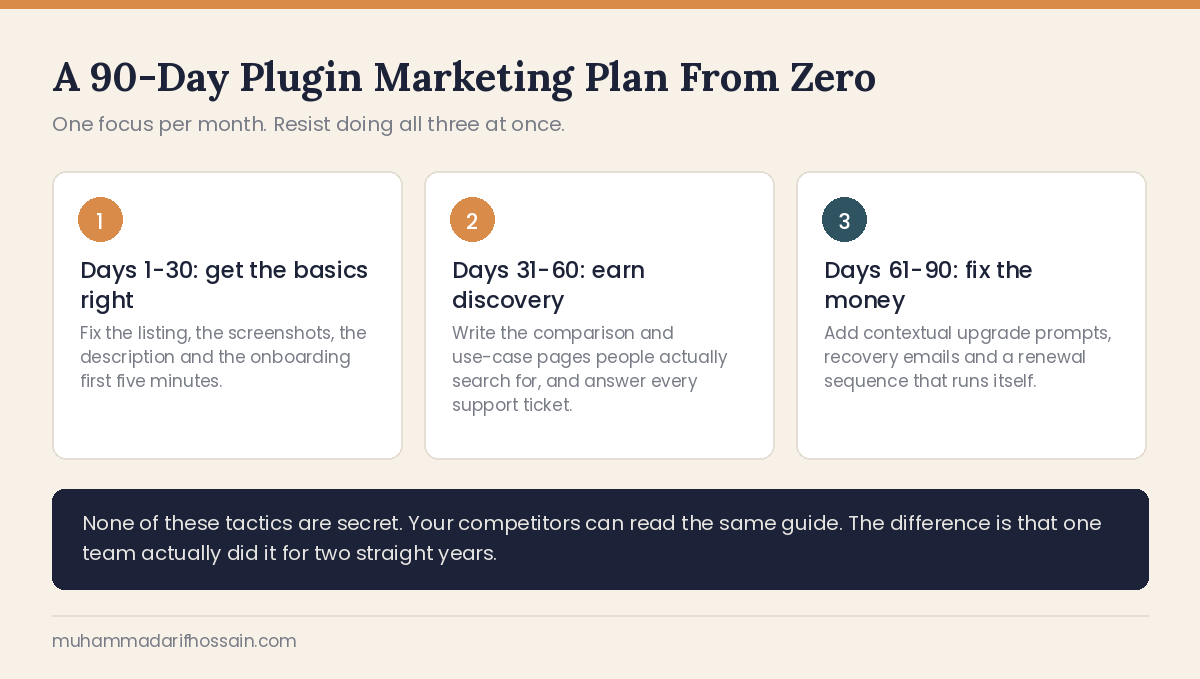
Month 1 — Fix the foundation.
Rewrite your .org listing title, description, and screenshots. Add a welcome screen and a basic setup wizard. Set up your onboarding email sequence. Add a deactivation feedback form.
Month 2 — Build discovery.
Publish four problem-focused blog posts. Publish one comparison page against your biggest competitor. Record two tutorial videos. Start answering questions in two communities.
Month 3 — Build conversion.
Rewrite your pricing page with three named tiers. Add contextual in-plugin upgrade prompts. Set up cart abandonment emails. Launch an affiliate program.
That’s ninety days to a complete funnel. Nothing here needs a budget. All of it needs consistency.
Mistakes That Quietly Kill Plugin Businesses
Discounting constantly. If you run a sale every month, nobody buys at full price. Ever again.
Copying a big competitor’s marketing. They have brand recognition you don’t. Their playbook won’t work at your stage.
Chasing every channel at once. Two channels done well beat six done badly.
Ignoring the free users. They’re not freeloaders. They’re your entire top of funnel, and they’re the people most likely to recommend you.
Going quiet between releases. Publishing once a quarter tells the market you might be abandoning the project. That kills trust faster than a bug does.
Frequently Asked Questions
How do you promote a WordPress plugin?
You promote a WordPress plugin by getting found where people already have the problem it solves. That means optimizing your WordPress.org listing for repository search, publishing problem-focused content that ranks in Google and gets cited by AI tools, creating comparison pages that catch people already looking to switch, and building integrations with plugins your target users already run. Then you convert those visitors inside your own WordPress plugin dashboard with contextual upgrade prompts.
Can you earn money by making a WordPress plugin?
You can earn money making a WordPress plugin, and plenty of people run six and seven-figure businesses this way. But the money comes from the business you build around the WordPress plugin, not from the code. Successful WordPress plugin businesses run a free version on WordPress.org for reach, sell annual licenses from their own site to keep more of the revenue, and spend most of their energy on marketing and support rather than features.
How do you get your first 100 plugin users?
You get your first 100 users by going narrow and manual. Publish the free version on WordPress.org with a keyword-accurate title. Answer ten questions in WordPress communities where your exact problem comes up. Email twenty people who publicly complained about that problem and offer to help them personally. Record one tutorial video. This doesn’t scale — that’s fine. The first hundred users are never won at scale.
How long does WordPress WordPress plugin marketing take to show results?
Plugin marketing typically takes three to six months to show meaningful results, and twelve months to compound. Content needs time to rank. Reviews accumulate slowly. Repository rankings move gradually. The businesses that win are the ones that keep publishing through the quiet months when nothing seems to be working.
Should you sell on a marketplace or your own website?
You should use both, but at different stages. Marketplaces like CodeCanyon give you instant exposure to buyers who are already shopping, at the cost of a large revenue cut and no customer relationship. Your own site means you keep nearly all the revenue, own the email list, and control the pricing. Start wherever gets you moving, but build toward owning your distribution — the customer list is worth more than any single sale.
Do you need paid ads to market a WordPress plugin?
You don’t need paid ads to market a WordPress plugin, and most successful WordPress WordPress plugin businesses grew without them. Ads work best as an accelerator once you already know your conversion rate and customer value. Before that, you’d just be paying to send traffic into a funnel that leaks. Fix the funnel first, then consider retargeting people who visited your pricing page and didn’t buy.
Related Guides
- Freemium vs Free Trial for WordPress Plugins: Which One Converts
- How to Grow a SaaS Business: 8 Steps and Mistakes to Avoid
- Conversion Rate Optimization: 6 Steps and Mistakes to Avoid
- Content Marketing Strategy: 8 Steps That Actually Work
- On-Page vs Off-Page SEO: The Difference and Best Place to Start
- Copywriting Strategy: 6 Steps and Mistakes to Avoid
The Part That Actually Matters
Here’s the uncomfortable truth about WordPress WordPress plugin marketing.
None of these tactics are secret. Your competitors can read this same guide. The difference between the plugins making money and the ones that don’t isn’t knowledge.
It’s that one team fixed their onboarding flow, wrote a comparison page, set up three recovery emails, and answered every support ticket for two straight years. And the other team kept adding features and waiting.
Pick the stage where your funnel leaks worst. Fix that one thing this month.
Then do it again next month.
Want a Second Pair of Eyes on Your Plugin Funnel?
Plugin marketing is unglamorous work spread across five stages, and almost nobody is weak at all five. Usually one stage is quietly costing you most of the revenue, and it is rarely the one you are worrying about.
I run full-funnel marketing for WordPress and SaaS products every working day, from WordPress.org listings to upgrade flows and renewal emails. If you want help finding where your funnel actually leaks, reach out here. I read and reply to every message myself.